Platform · Systems view

Architecture built for DPDPA-grade consent evidence and vault-oriented security

Kavach is a consent and rights control plane that coexists with the systems you already run. Use it at the collection edge so principals meet Kavach first, or behind the scenes via REST APIs while your apps keep their UX — always with a Data Principal Portal for transparency, outbound webhooks so CRM, CDP, and core applications consume governed events, and a vault-backed ledger that downstream tools never have to re-implement.

  • Edge + API dual operating models
  • Webhooks into your estate
  • Vault-centred consent ledger
  • DP Portal · notices + rights

Logical architecture

Three planes: collection, control, and trust

Collection surfaces stay thin. Policy, evidence, and sensitive material live behind explicit service boundaries. The trust layer centralises what must never sprawl across app servers in plaintext: signing material, integration secrets, and the anchors that make consent history defensible.

Fig. 1 — Component topology

Read-only reference · not a deployment diagram

Embeds and APIs funnel into engines that enforce notice artifacts and purpose maps. Evidence is centralised so the same timeline backs the admin console, the principal portal, and regulator-ready extracts.

Why this split matters

When consent is treated as a row in a generic CRM field, you lose linkage between what was shown, what was agreed, and who may still rely on it. Kavach keeps those links in the ledger so withdrawal and erasure propagate with traceability.

  • Notices and purposes are versioned artifacts, not one-off copy blocks.
  • Each consent event carries correlation IDs across channels.
  • Reporting queries the same store principals see — no shadow databases.

Enterprise coexistence

Designed to sit next to CRM, CDP, core apps, and your data platform

Kavach is not a rip-and-replace data store for your business. It is the system of record for lawful processing posture: what was disclosed, what was consented to, what changed, and what the principal asked for next. Your CRM, marketing automation, loan origination stack, or warehouse continue to own commercial transactions — they receive signals (webhooks and API responses) that are already bound to notice versions, purposes, and correlation IDs from the vault-backed ledger.

Typical coexistence patterns we see in production-shaped discussions:

  • Identity and profile: Kavach holds consent and rights evidence; your IdP or CRM remains authoritative for customer master — linked via stable identifiers you control.
  • Campaign and personalisation: Downstream tools subscribe to withdrawal and purpose-change events so audiences and journeys update without manual reconciliation.
  • Regulatory and audit: Exports and audit views read the same ledger the DP Portal uses — eliminating “compliance copy” that diverges from what principals were shown.

Fig. 2 — Kavach in the IT landscape

Logical integration · your topology will vary

Whether the principal touches Kavach UI or only your branded surfaces, the engine and vault remain the choke point for evidence. Webhooks fan out after the record is anchored — so downstream systems react to durable state, not optimistic UI.

Operating models

Collection edge · API-first backplane

Most enterprises use both over time: Kavach-hosted collection for high-risk or regulated journeys, and silent API integration where UX is already fixed. The DP Portal and operator consoles stay unified — one ledger, one rights queue, one audit story.

A Collection edge — Kavach at the forefront

Principals interact with Kavach-rendered notices and purpose controls at the moment personal data is collected: hosted forms, embeds, and collection points wired to your domains.

  • Notice and purpose text is versioned and bound to the submission payload before any downstream persistence.
  • Consent events land in the vault-backed ledger first; webhooks and API callbacks notify CRM, onboarding, or fulfilment systems to proceed with a correlation ID and purpose map.
  • Ideal when you need maximum defensibility at the capture surface or multi-language notices without redeploying legacy apps.
B API-first — background consent management

Your existing web or mobile flows stay visually unchanged. Server-side integration calls Kavach to record consent, link notice artifacts, and register the principal for rights handling.

  • REST APIs for consent capture, lookup, withdrawal propagation, and principal resolution — designed for idempotent, retry-safe server-to-server use.
  • The Data Principal Portal still gives individuals a single place to see history, notices, and open requests — even when they never saw a Kavach-branded form.
  • Webhooks keep satellite systems aligned when state changes inside Kavach (withdrawal, erasure completion, grievance updates).

Integrations

Webhooks and REST — machine contracts for your stack

Outbound webhooks are how Kavach pushes durable state changes into systems that should not poll the ledger continuously: marketing clouds, case management, data pipelines, or internal workflow engines. REST APIs serve synchronous checks (“may we process for purpose X right now?”) and server-side writes from your applications. Together they let Kavach act as the compliance nervous system without owning your transactional databases.

Webhook design characteristics

  • Event-sourced payloads: Each delivery references ledger anchors — suitable for idempotent consumers and replay-safe workers.
  • Signing and verification: Integrations verify origin using shared secrets or signing keys issued from the vault boundary (not hard-coded in app repos).
  • Retries with backoff: Failed endpoints are retried on a controlled schedule; dead-letter handling aligns with your enterprise messaging standards.
  • Filtering: Subscribe by event family or collection point so only relevant services receive traffic.

Representative event families

Exact event names and schemas are provided in integration documentation; the table below is a conceptual map for architects.

Domain Example events Typical consumers
Consent Granted, updated, withdrawn; purpose bound or revoked CRM, CDP, campaign tools, consent caches
Notice Published, superseded; principal acknowledged (where captured) Content CMS hooks, policy archives
Rights Request opened, assigned, fulfilled, rejected with reason Ticketing, SLA dashboards, legal holds
Principal Profile linked, portal activated, identifier reconciled Identity bridges, master data

DPDPA-aligned capture, not checkbox theatre

The Act expects meaningful notice, lawful basis, and the ability for principals to withdraw consent. The platform models those as explicit transitions: validate the notice snapshot, bind purposes, append an immutable event, return a receipt the principal (and your auditors) can reason about.

Fig. 3 — Consent event sequence

Simplified happy path

Withdrawal, correction, and erasure requests reuse the same correlation model so downstream systems can reconcile state without ad hoc spreadsheets.

  • Inform

    Publish notices in the languages you operate; pin the exact text and version to each collection point.

  • Consent

    Granular purposes, proof of presentation, channel metadata, and timestamps in one continuous record.

  • Empower

    Self-service history plus operator queues for access, correction, erasure, and grievance timelines.

  • Report

    Filterable audit trails and exports structured for internal audit, boards, and regulatory dialogue.

Data Principal Portal

One front door for notices, consent history, and statutory rights

The DP Portal is not a marketing microsite. It is an authenticated experience (magic link, OTP, or your IdP — depending on deployment) where individuals see the same notice and consent lineage your operators and auditors see, within the permissions model you configure. It reduces inbound email volume, shortens grievance cycles, and gives regulators a credible story: transparency is productised, not improvised in spreadsheets.

Notice types the portal can surface

Notices are first-class objects: versioned, multilingual where you enable languages, and tied to collection contexts. Principals typically encounter:

  • Collection-point notices: Short, contextual text shown at the exact form or workflow step — aligned with DPDPA expectations that individuals know why data is collected before or at collection.
  • Privacy / fair-processing notices: Longer policy narratives maintained in Kavach so updates propagate to the portal history without redeploying every app.
  • Purpose-specific disclosures: Where processing rests on consent, principals see purposes, categories, and retention hints you attach to each purpose map.
  • Supersession trail: When legal or product changes retire a notice, older versions remain discoverable for individuals who consented under them — critical for “what did I agree to on date X?” questions.

Rights workflows exposed to principals

The portal is the intake surface; your operators fulfil inside Kavach (or via integrations). Supported request families align with the DPDPA’s operational expectations for data principal empowerment:

  • Access and information: Request copies or summaries of personal data you hold, with status tracking from submission to closure.
  • Correction: Principals flag inaccurate or incomplete fields; your team records fulfilment evidence in the same ledger-backed case file.
  • Erasure: Requests flow into governed queues with legal-hold and downstream-system flags where applicable — not a single “delete row” button without traceability.
  • Consent withdrawal: Withdrawal propagates to the consent engine; webhooks notify CRM, personalisation, and channel tools to stop relying on the withdrawn purpose.
  • Grievance redressal: Structured intake with timestamps suitable for escalation timelines your legal team defines.
  • Nomination: Where you enable it, principals can record nominee preferences consistent with the Act’s nomination provisions — auditable like other rights events.

Kavach provides operational tooling and evidence trails; statutory interpretation for your sector remains with your counsel.

Fig. 4 — Portal ↔ engine ↔ your estate

Rights and notices share one ledger

Portal reads and rights writes hit the same engine as APIs and collection surfaces — so marketing never argues with legal about “which copy the customer saw.”

Security model

Vault-backed trust boundary

“Industrial” security here means predictable zones: hardened edge, minimal-privilege services, and a vault-shaped enclave for secrets and key operations. Data at rest uses layered encryption; sensitive operations never assume the application tier is a safe long-term home for root credentials.

Fig. 5 — Trust zones

Defence in depth · schematic

Exact deployment topologies vary by customer environment; the invariant is that signing and integration secrets are brokered through controlled interfaces rather than configuration files on worker nodes.

Product surface

Same surfaces as the homepage tour — in still form

These captures mirror the Inform → Consent → Empower → Report narrative on the home page. Together they show the collection edge, operator consoles, the data principal portal, and audit surfaces that tie back to the same vault-backed ledger and webhook contracts described above. Branding, languages, and policy packs are tenant-specific at runtime.

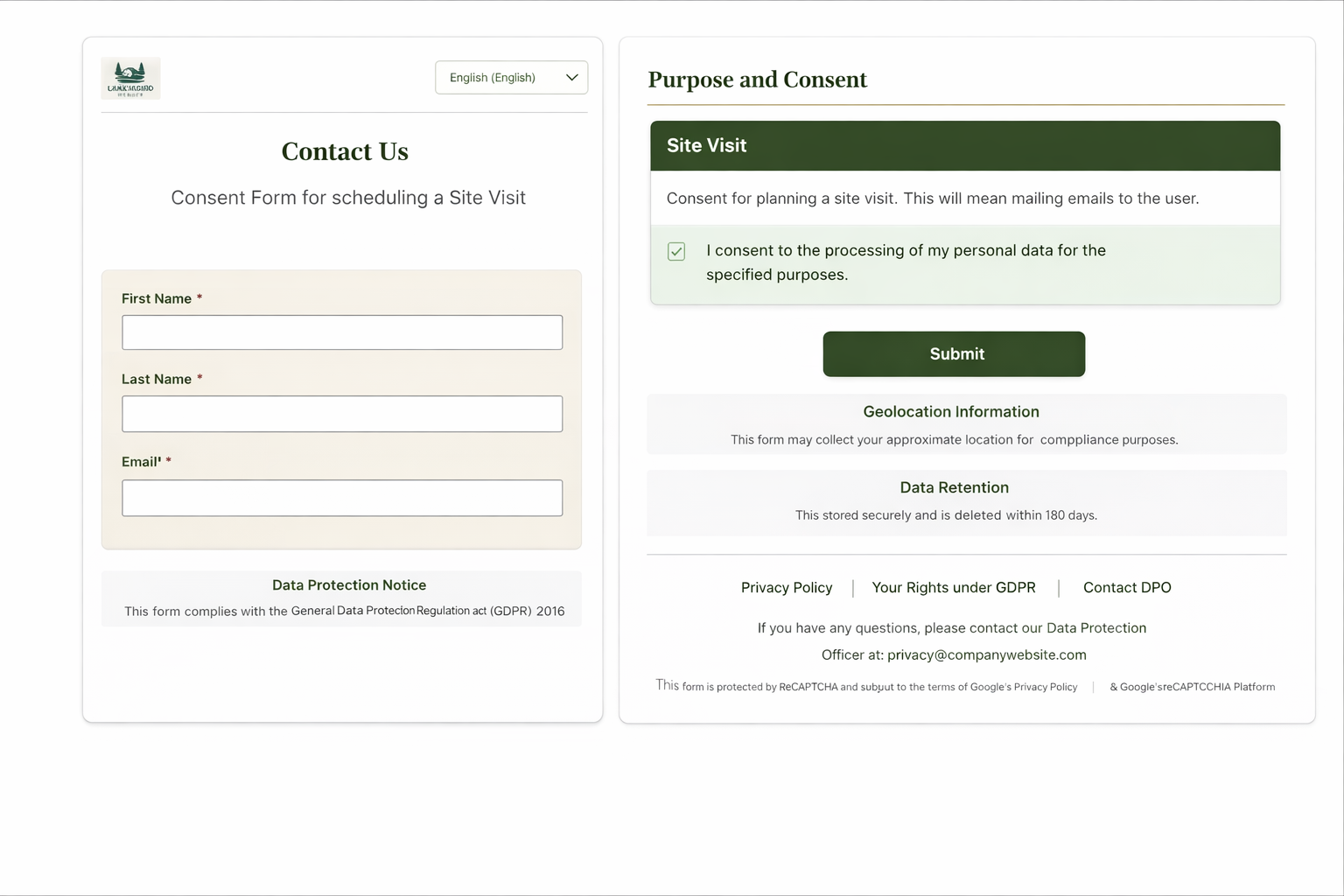
Web form with data protection notice and purpose-based consent choices
Inform · Collection Notice and purposes rendered at the point of capture — aligned with DPDPA expectations for transparency.
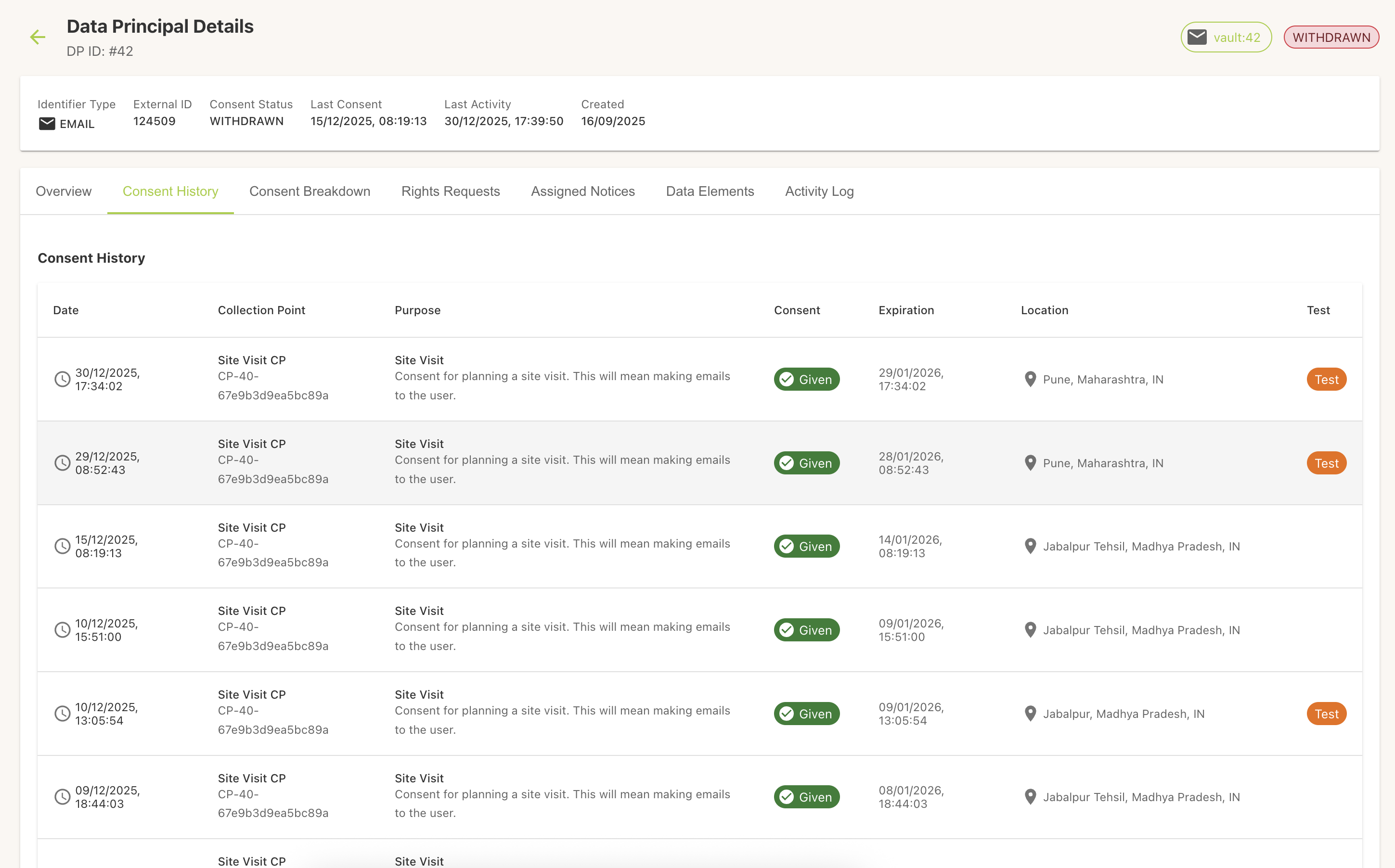
Consent management screen showing consent records
Consent · Admin Operational view of consent posture across principals and purposes.
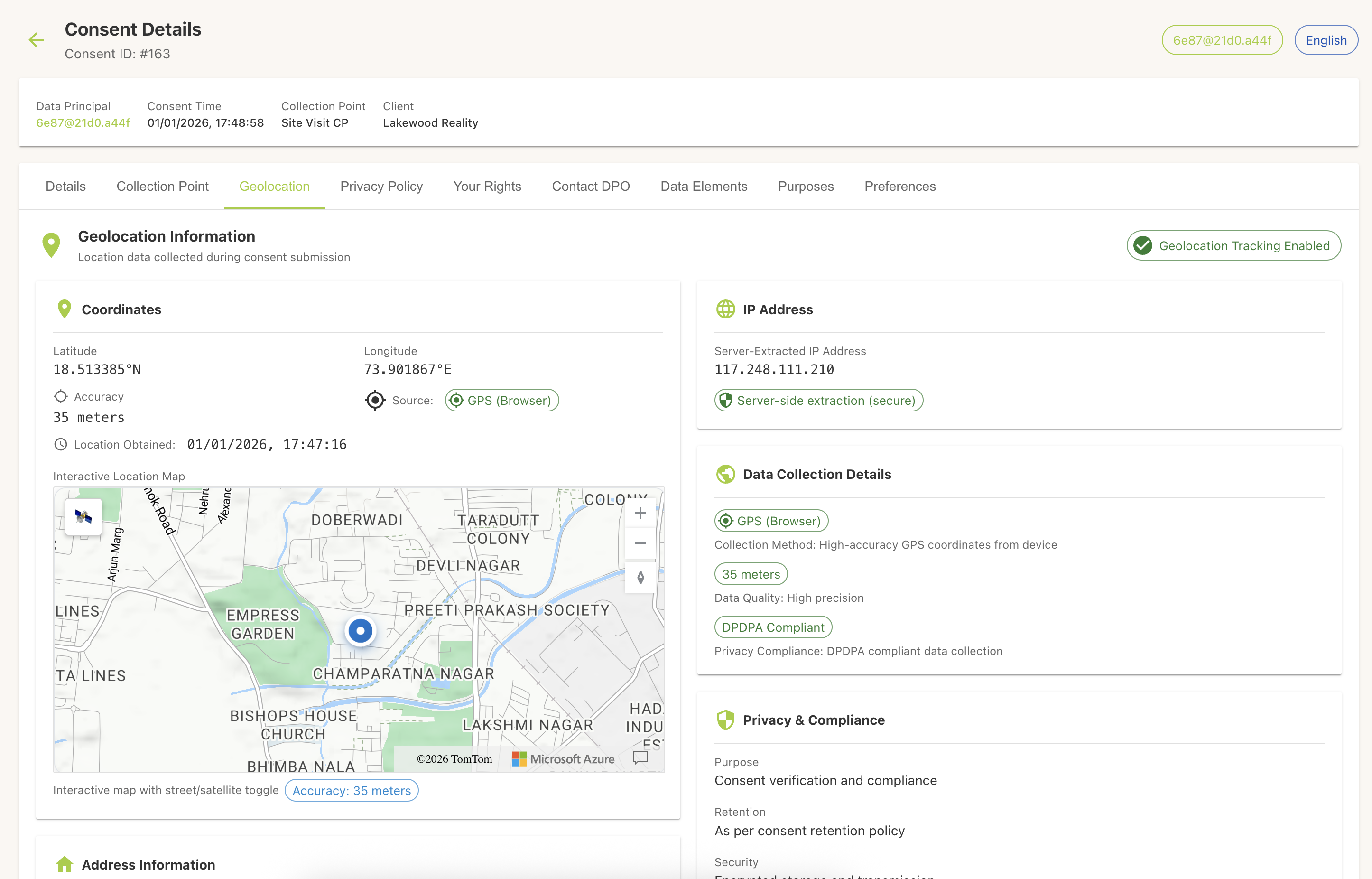
Per–data principal consent timeline with events and timestamps
Consent · Evidence Timeline semantics: who changed what, when, and under which notice version.
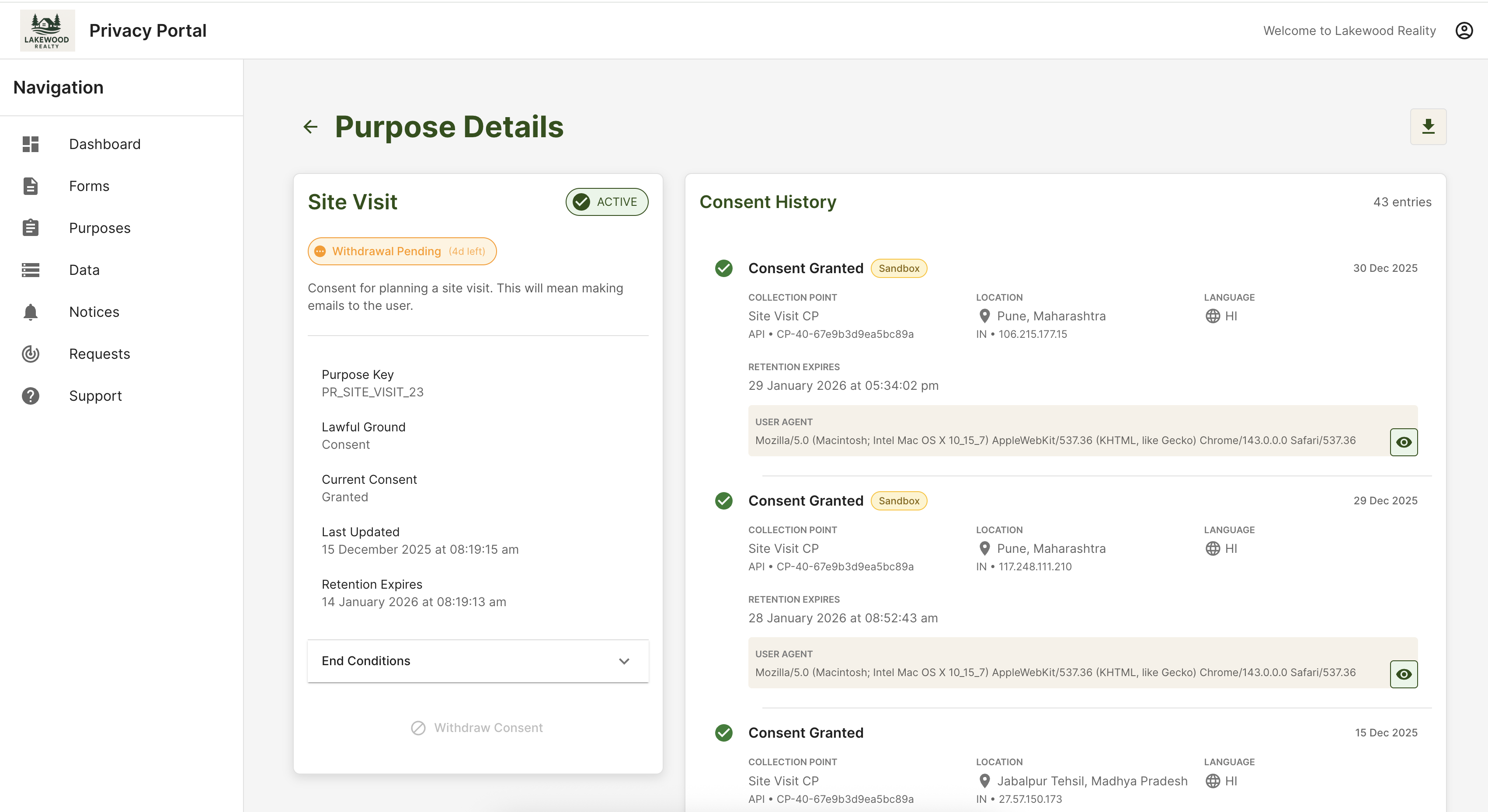
Data principal portal showing consent history and preferences
Empower · Portal Principals see history, active purposes, and withdrawal paths without opening a ticket for every question.
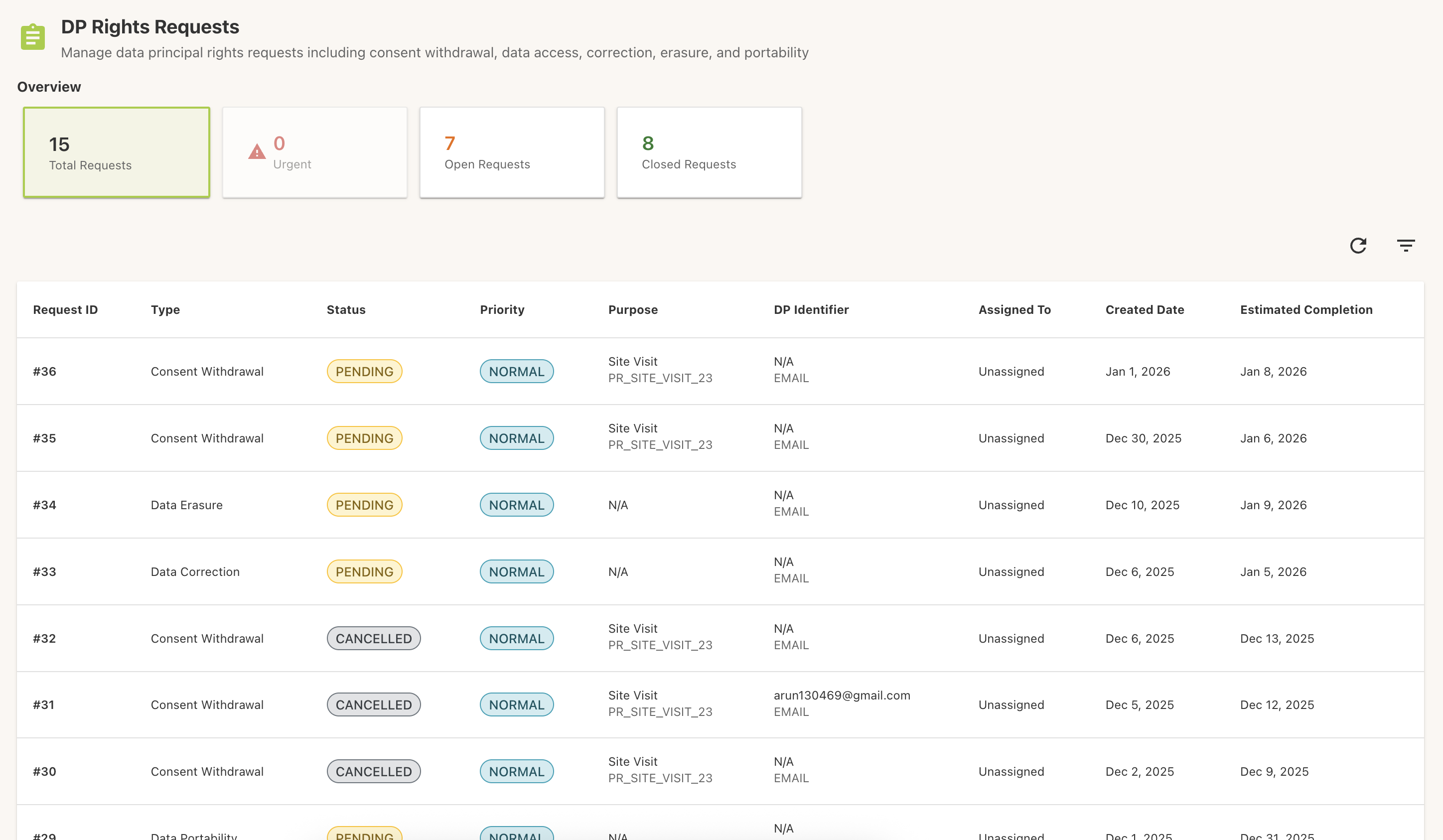
Rights request queue with status and assignment
Empower · Operations Queued access, correction, erasure, and withdrawal work — SLA-friendly status and ownership.
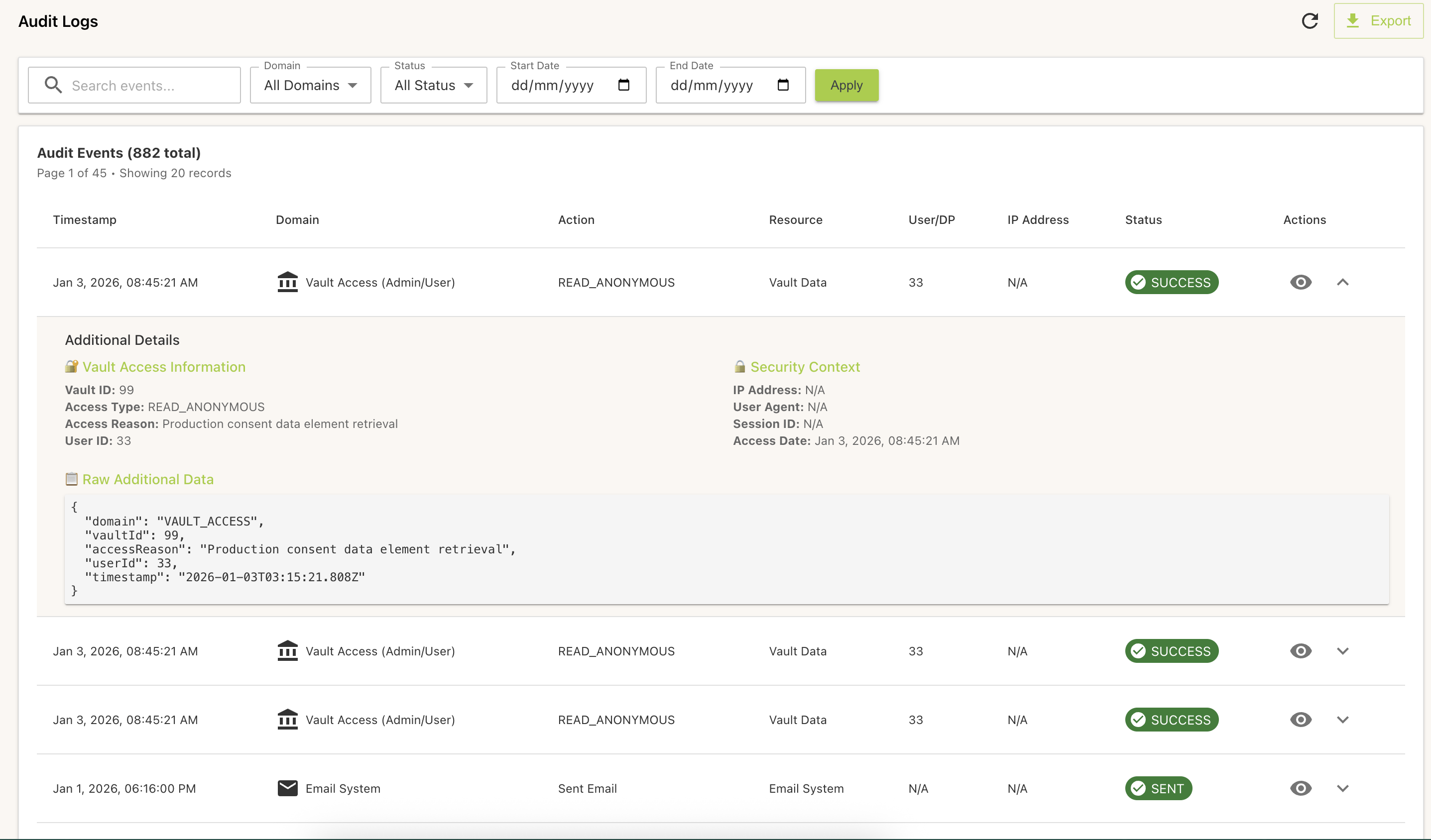
Audit log with filters and export
Report · Audit Filter, drill, and export the same lineage regulators and boards ask for under stress.
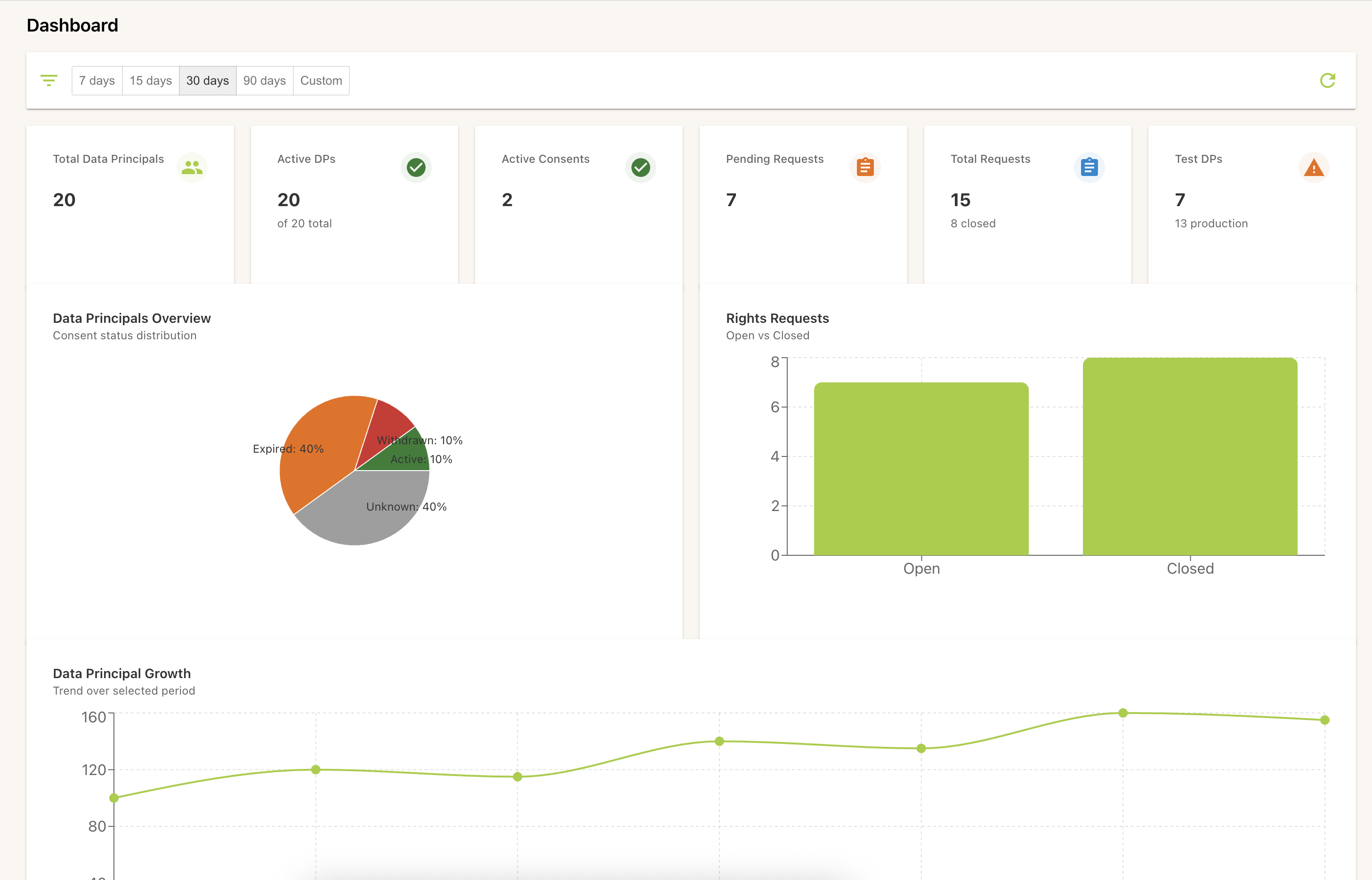
Compliance dashboard with KPI cards and trend charts
Report · Posture Roll-up view: where principals, consents, and requests trend — so gaps surface before they become incidents.

Engineering walkthrough

Want the architecture mapped to your data inventory and integrations? We will align collection surfaces, vault assumptions, and export requirements to your stack.

Book a technical demo